Free tools · Notion

Job application tracker for Notion

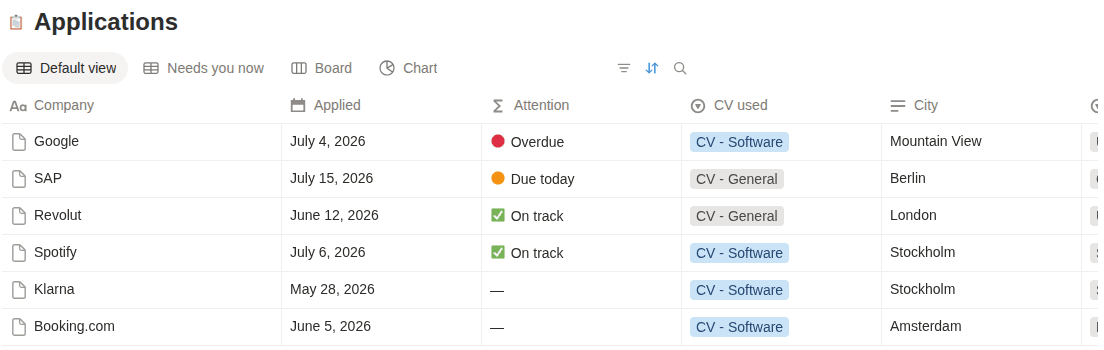
A duplicatable Notion database with the same 13 properties as the spreadsheet versions — plus board, table and calendar views, because that's what Notion is for. The Notion version is being finished — leave your email and it lands in your inbox the moment it's live.

What's inside the Notion template

13 columns — the ones that answer “what did I send, to whom, and what's next?” — and not one more.

  • Company

    Who you applied to.

  • Role

    The exact title from the posting.

  • Status

    One of ten stages, Saved through Archived.

  • Applied on

    The date it actually went out.

  • CV version sent

    Which CV they have — the thing everyone forgets.

  • Last reply

    When you last heard from them.

  • Next action

    The one thing to do next.

  • Next action date

    When to do it. Sort by this column each morning.

  • Contact

    Recruiter or hiring manager, if you have one.

  • Source

    Where you found the role.

  • Job URL

    The posting, before it disappears.

  • Salary range

    Posted or guessed — mark which.

  • Notes

    Anything future you will want to know.

Status stages: Saved · Preparing · Applied · Assessment · Interview · Final stage · Offer · Rejected · Ghosted · Archived — the same ten stages Erioun uses, so moving up later is a rename-free experience.

How to use it

  1. Duplicate the template

    Open the template link and hit Duplicate in the top-right corner to copy it into your own workspace.

  2. Add each application as a database entry

    One entry per application. Fill in company, role, status, applied date and the CV version you sent.

  3. Pick the view that fits the moment

    Board grouped by Status for the overview, table for editing, calendar by Next action date for planning the week.

  4. Move cards as replies arrive

    When you hear back, drag the card to its new stage and update Last reply. Notion won't do this part for you — that's the deal with templates.

Get notified when it's ready

The Notion version is being finished — leave your email and it lands in your inbox the moment it's live.

Verifying you're human in the background…

Frequently asked

Does the tracker work on Notion's free plan?

Yes. It's a single database with views and properties — nothing that needs a paid plan. Duplicate it into any personal workspace.

Which views does the Notion template include?

Three: a board grouped by the ten status stages, a full table for quick editing, and a calendar on Next action date so follow-ups have a home.

Can Notion remind me to follow up?

Partially. You can add a date reminder per entry by hand. There's no built-in "it's been quiet for 7 days" logic — spotting silence stays your job in any template.

Notion or a spreadsheet — which should I use?

Use Notion if you already live there; the board view is genuinely nicer for pipelines. Use Sheets or Excel if you want faster bulk editing and sorting. Both are manual — the columns are identical, so switching later is painless.

The honest upsell

This is the manual version.

Erioun fills itself in — every application gets its own email address, replies file themselves and statuses stay current. You're always one tap from adjusting, and nothing is ever sent without you.